

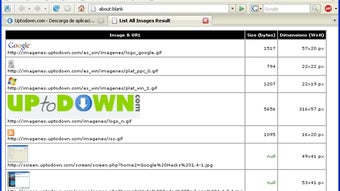


Description
Download List All Images – Free Browser Add‑on for Quick Image Extraction
Overview
List All Images is a lightweight, free browser add‑on created by DonGato for Windows users who need a fast, reliable way to see every image embedded on a web page. Positioned in the “Add‑ons & Tools” category, this utility works directly inside your favorite browser, scanning the page’s HTML and presenting a clean, sortable list of image URLs, file sizes, and preview thumbnails. Whether you are a web designer gathering assets, a content marketer curating visual references, or a casual user simply curious about the media behind a site, List All Images eliminates the tedious manual inspection that browsers normally hide. The tool is built on a secure, no‑track architecture, meaning it does not transmit your browsing data to external servers, and it receives regular updates to keep pace with modern web standards like lazy loading and responsive image sets. Because it runs as a browser extension rather than a standalone program, installation is a single click, and the interface blends seamlessly with the browser’s toolbar, offering instant access without opening a separate window. In short, List All Images provides a focused, efficient solution for extracting image data, making it a must‑have utility for anyone who works with web‑based visual content on a regular basis.
Key Features of List All Images
- Full‑Page Image Scan: Detects every
tag, background images, SVGs, and lazy‑loaded assets on the current page. - Sortable Table: Columns for URL, dimensions, file size, and MIME type can be sorted ascending or descending with a single click.
- Live Preview Thumbnails: Hover over any row to see a small preview, helping you quickly identify the right asset.
- Bulk Copy & Export: Copy selected URLs to clipboard or export the full list to CSV for further processing.
- Filter Options: Filter by file type (JPG, PNG, GIF, WebP), size range, or domain to narrow down large result sets.
- Secure, No‑Telemetry Design: The add‑on runs entirely locally; no data is sent to third‑party servers.
- Automatic Updates: Integrated update checker ensures you always have the latest compatibility patches.
- Lightweight Footprint: Consumes less than 5 MB of RAM and adds virtually no load time to the browser.
- Multi‑Browser Support (Future Roadmap): Currently optimized for Chrome and Edge, with plans to expand to Firefox and Opera.
Installation, Usage Instructions & Compatibility
Step‑by‑Step Installation
- Visit the official List All Images download page and click the “Add to Chrome” (or “Add to Edge”) button.
- A confirmation dialog appears; click “Add extension” to grant the necessary permissions.
- After the download completes, the List All Images icon appears next to the address bar.
- Optional: Pin the icon for quick access by right‑clicking the extension and selecting “Pin”.
How to Use the Add‑on
- Navigate to any web page containing images.
- Click the List All Images icon; a side panel slides out showing a table of all detected images.
- Use the column headers to sort, or apply the filter bar at the top to narrow results.
- Select one or multiple rows, then click “Copy URLs” or “Export CSV” to transfer the data.
- Hover over a row to view a live thumbnail; click the URL to open the image in a new tab.
System Requirements & Operating System Compatibility
List All Images is built for Windows 10 and later (64‑bit). The extension is compatible with Chromium‑based browsers such as Google Chrome (version 80+) and Microsoft Edge (version 80+). While the current release does not support macOS or Linux, a web‑based companion tool is planned for future updates, extending functionality to Safari, Firefox, and mobile browsers on Android and iOS.
Troubleshooting Tips
- If images are missing, ensure the page has fully loaded; lazy‑loaded assets may appear after scrolling.
- Disable any conflicting ad‑block extensions temporarily, as they can block image URLs from being detected.
- Clear the browser cache and reload the page if the list appears empty despite visible images.
Pros, Cons, Frequently Asked Questions & Final Verdict
Pros
- Completely free with no hidden fees.
- Fast, on‑the‑fly scanning without leaving the browser.
- Rich filtering and export options for power users.
- Zero telemetry ensures privacy‑focused usage.
- Lightweight and does not affect browser performance.
Cons
- Currently limited to Windows‑based Chromium browsers.
- No built‑in image downloader; users must manually save images.
- Advanced features like bulk renaming are not yet supported.
- Future macOS/iOS support is announced but not available today.
Frequently Asked Questions
Is List All Images safe to install?
Yes. The add‑on runs locally in your browser and does not collect personal data or send information to external servers.
Can I download the images directly from the list?
The current version focuses on listing and exporting URLs. You can copy URLs and use a download manager, or open each image in a new tab to save manually.
Does the tool work on pages that use lazy loading?
Yes. List All Images detects lazy‑loaded images once they appear in the DOM, so scrolling through the page before scanning ensures all assets are captured.
Is there a limit to the number of images it can list?
No artificial limit exists. The extension will list every image the browser can access, limited only by the page’s total image count and your system’s memory.
Will the add‑on receive regular updates?
Yes. DonGato has implemented an automatic update checker that notifies users when a new version is available, ensuring compatibility with the latest browser releases.
Conclusion & Call to Action
For anyone who routinely interacts with web‑based visual assets, List All Images delivers a streamlined, privacy‑first experience that removes the guesswork from image extraction. Its free price tag, intuitive interface, and robust feature set make it a standout addition to any Windows‑based browsing toolkit. While the current platform support is limited to Chromium browsers on Windows, the roadmap promises broader OS coverage, which will only increase its appeal. If you need a quick, secure way to catalogue every picture on a page without resorting to developer tools or manual inspection, download List All Images today and boost your productivity with just a single click.
Guides & Tutorials for List All Images
How to install List All Images
- Click the Preview / Download button above.
- Once redirected, accept the terms and click Install.
- Wait for the List All Images download to finish on your device.
How to use List All Images
This software is primarily used for its core features described above. Open the app after installation to explore its capabilities.
User Reviews for List All Images 0
No reviews found





